

Escape the Multi-Stack Trap: Modernize Desktop UIs in Java Without a Full React Rewrite#
Large Swing, JavaFX, or RCP applications often carry a decade or more of business logic, MVC layering, and institutional knowledge. Their problem is rarely “the business logic is wrong”; it is that the delivery channel remains tied to the desktop, Citrix, or RDP. Meanwhile, the default answer to “move to the browser” is often: RESTify the backend and rewrite the entire UI in React or Angular—yielding two build systems, two pipelines, two hiring profiles, and a boundary where it is hard to set breakpoints on the UI from Java during integration.
Another path is: first move the existing GUI into the browser with Webswing, then replace high-traffic screens incrementally with webforJ, keeping Java as the primary stack throughout. Speaker Stephan Wald (BASIS International, creator of webforJ) at JavaOne ’26 is not arguing “reject all frontend technology”; he is writing organizational cost into architecture choices: when the team is already Java-centric and the legacy UI footprint is huge, render bridging plus gradual replacement is often more controllable than the default REST+SPA path. This article organizes the engineering narrative for that combination and marks verifiable vs. unverified boundaries against official documentation; HTTP versioning and mobile adaptation are not expanded here because the session did not cover them.
Figure: Opening title “Escape the Multi-Stack Trap / Modernizing Java UIs Without JavaScript”.
The Real Enemy of Legacy Systems: The Delivery Channel, Not Business Logic#
Why: Full rewrites in ERP, manufacturing, and financial systems often hit execution risk—“year three still chasing year two’s scope.” Worse, people who understand domain rules leave during a long migration, and the team spends years on feature parity with zero new business value (speaker opinion; the “500K–2M lines” scale range is also oral testimony with no independent public benchmark).
Mechanism / constraints: In a well-layered Java GUI, the service layer and domain model are often still reusable; what is expensive is UI semantics, desktop file dialogs, MDI window models, and operational delivery. Both Webswing and webforJ product narratives emphasize “low-risk path to the web” in contrast to “rip and replace”—see the Webswing modernization framework.
What to do: Separate the decision “can it run in the browser?” from “must every screen be rewritten in a new framework?”; drive priorities by business value (accessibility, deployment, collaboration), not by tech fashion driving a full replacement.
Common pitfalls: Treating “legacy” as synonymous with “should be thrown away”; committing to a full ERP replacement before measuring usage frequency.
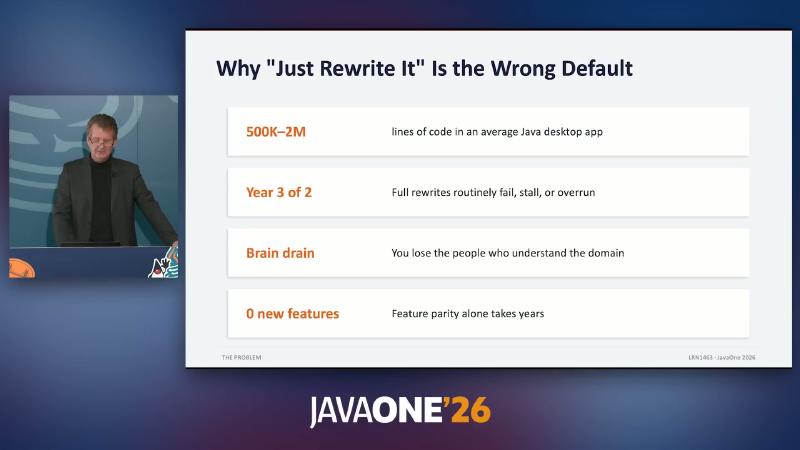
Figure: Slide “Why ‘Just Rewrite It’ Is the Wrong Default”—Scale (500K–2M), Execution Risk, Knowledge Loss, Opportunity Cost.
The Multi-Stack Tax: Organizational Friction at the REST Boundary#
Why: The classic path splits a Swing application into “Java API + JS SPA.” The Java team owns business logic and endpoints; the JS team owns React state and the build chain. Every feature requires cross-REST contract negotiation; every defect can become a “frontend or backend?” dispute (speaker opinion; the webforJ site also emphasizes a single-stack Java narrative—see Client/Server Interaction).
Mechanism / constraints: Dual stacks are not just one more language—they are double CI/CD, double dependency upgrade surface, double security patch cadence. When a senior frontend engineer leaves, the Java team may be forced to maintain a React codebase they are not expert in—organizational single-point risk, not merely a syntax problem.
What to do: If the strategic goal is “the Java team can deliver web independently,” pull UI event handling back to the JVM (webforJ model), or use Webswing first for zero source changes browser delivery, then plan a hybrid period.
Common pitfalls: Assuming “just one more React project” is affordable; underestimating the long-term tax of API versioning, DTO mapping, and E2E tests.
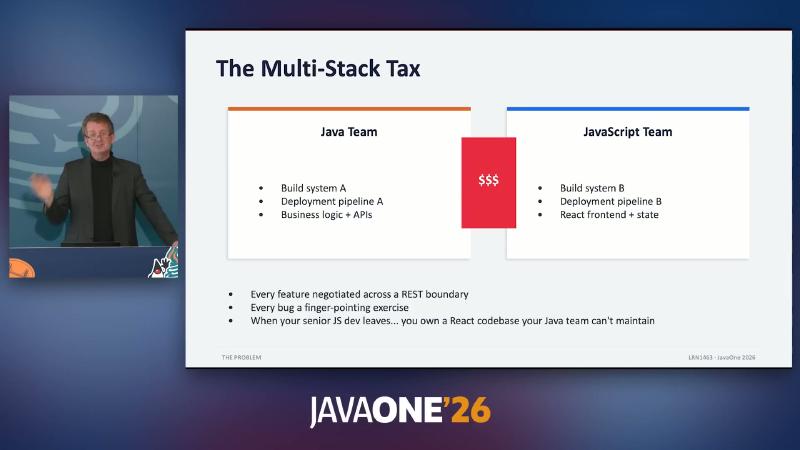
Figure: “The Multi-Stack Tax”—Java Team and JavaScript Team side by side, REST boundary and maintenance risk.
Webswing: Server-Side GUI, Browser Canvas#
Why: Business stakeholders often want “usable in the browser tomorrow,” not after an eighteen-month rewrite. Webswing is positioned to run Swing, JavaFX, SWT, and other desktop stacks in the browser without changing application source (site states without changing a single line of source code).
Mechanism / constraints (layered understanding):
| Layer | Officially verifiable statement | Speaker supplement (not verbatim in docs) |
|---|---|---|
| Rendering | Server captures GUI, streams to browser via HTML5 canvas | Hooks at AWT render layer, intercepts draw commands |
| Transport | Webswing Server + browser session | Analogy to “Java RDP” |
| Deployment | Admin / config files specify classpath, mainClass, JVM args | Bundled Jetty (demo site response headers show Jetty) |
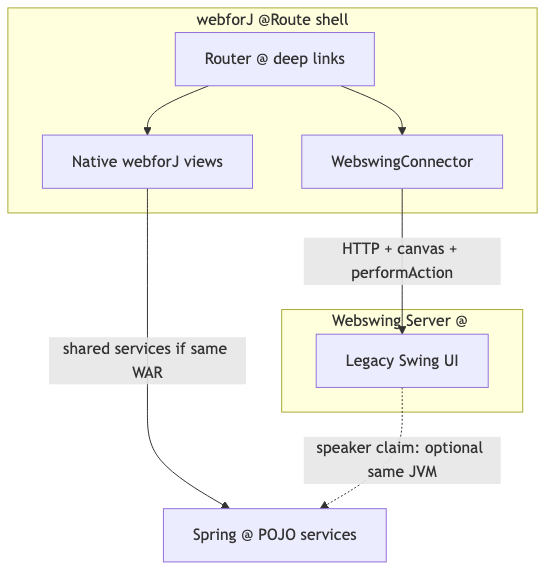
webforJ integration overview states: renders the desktop app on the server and streams the interface to the browser using HTML5 canvas. Treat “AWT injection” at the implementation layer as a speaker mechanism analogy; when writing, use “server-side GUI + Canvas stream” as the authoritative framing.
What to do:
# Verify locally whether the demo is listening (URL varies by install)
curl -I http://localhost:8080/webswing-demo/
curl -I http://localhost:8080/admin
In Admin or config, set Application Name, Main Class, Classpath, Home Directory, JVM Arguments (fields per Setup). Desktop JFileChooser typically maps to upload/download in the browser (File handling).
Common pitfalls: Expecting Swing to look pixel-perfect like native web components; ignoring semantic differences for file dialogs, window decorations, modality—each needs Webswing API adaptation. Demo Configure window (Parent, Undecorated, Maximized, Modality) shows ops-tunable window behavior but cannot replace product-level expectation management for “web-native interaction”—have business stakeholders test printing, fonts, and multi-monitor scenarios in PoC (demo page includes Printing, Rendering mode).
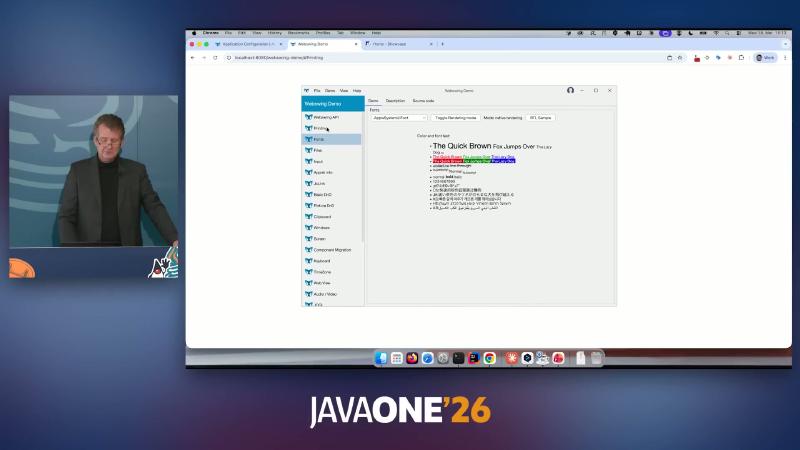
Figure: Chrome at localhost:8080/webswing-demo — Webswing API, Toggle Rendering mode / native rendering.
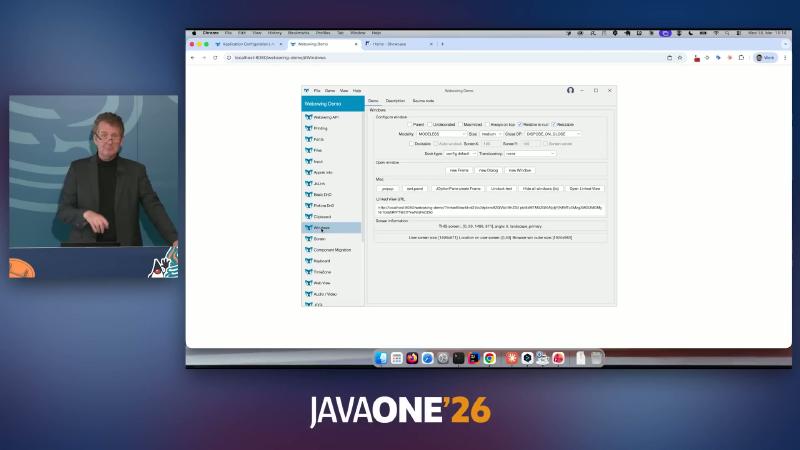
Figure: Webswing Demo — Configure window, Parent (-/Undecorated) (/ Maximized).

WebswingConnector: A Thin Integration Layer for Hybrid UI#
Why: After full-screen legacy UI runs, the product still needs modern navigation, deep links, and new forms. Rewriting every screen at once is unrealistic; you need to embed the deployed Webswing URL inside the same web application shell.
Mechanism / constraints: WebswingConnector has been available since webforJ 25.10 (Release 25.10). Typical shape: @Route + Composite<Div>, pass Webswing base URL in the constructor, setSize, then add getBoundComponent(). Cross-stack collaboration should prefer documented performAction / onAction (Communication), not assume default same-JVM shared objects.
Speaker opinion (not guaranteed by docs): If Webswing and webforJ deploy on the same web server / same JVM, they may share a ClassLoader and pass session context directly; official default examples are often split ports + CORS—merged deployment requires your own verification of class loading and Swing EDT rules.
What to do:
@Route
public class SwingAppView extends Composite<Div> {
  public SwingAppView() {
    var connector = new WebswingConnector("http://localhost:8080/myapp/");
    connector.setSize("100%", "600px");
    getBoundComponent().add(connector);
  }
}
In production, configure allowedCorsOrigins per Setup and avoid conflicting with webforJ’s default 8080 port (demos often stop Webswing first, then mvn jetty:run).
Common pitfalls: Treating “8 lines on a slide” as meaning no webforj-webswing dependency; ignoring the bidirectional message protocol and routing everything through REST anyway.
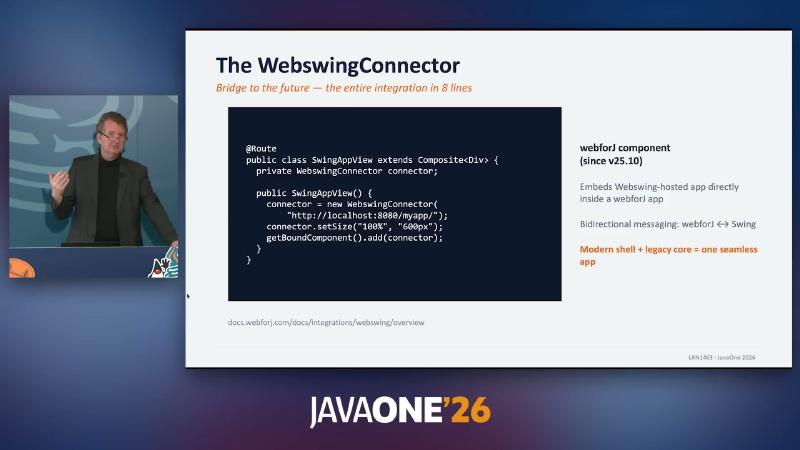
Figure: Slide — SwingAppView, new WebswingConnector("http://localhost:8080/myapp/"), docs.webforj.com/docs/integrations/webswing/overview.
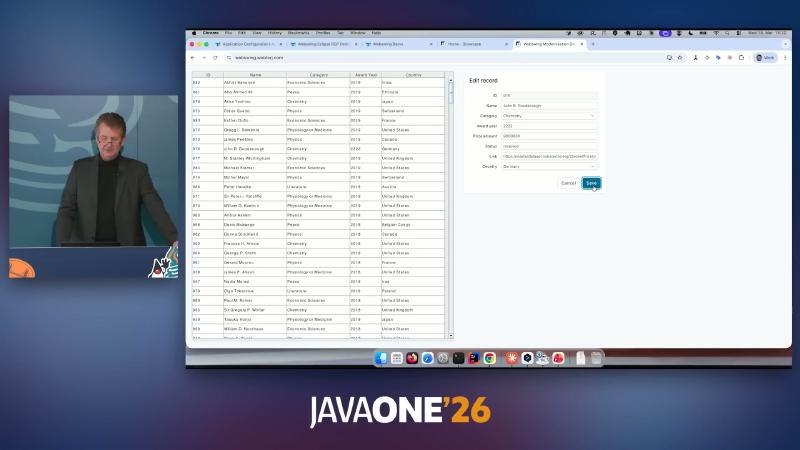
Figure: Browser — Webswing Modernisation DevX, webswing.webforj.com, table and Edit record.
webforJ: Modern Web UI in a Single Java Stack#
Why: After the hybrid period, high-traffic screens need responsive layout, routing, data binding, and Spring integration—while Swing-background developers keep a “components + events” mental model instead of forcing a team split.
Mechanism / constraints:
- Application classes extend
App, create aFrameinrun(), mountParagraph,Button, etc.; events likeButton.onClickgo client → server, handlers run on the JVM (consistent with “thin client” product wording). - Default WAR packaging; Archetype 25.11 template uses
jetty-ee11-maven-plugin, Jetty 12.1.2 (per Maven Central; live OCR once showed Jetty 12.2.2—Central wins). - Routing: current template uses
@Routifypackage scan + view class@Route(session OCR’s@Routeshas evolved—see Routing).
What to do:
@AppTitle("Simple Counter") // New templates may use @AppProfile — follow docs
public final class Application extends App {
  private int count = 0;
  private final Paragraph text = new Paragraph("Count: 0");
  private final Button button = new Button("Counter");

  @Override
  public void run() throws WebforjException {
    var mainFrame = new Frame();
    mainFrame.add(text, button);
    button.onClick(e -> {
      count++;
      text.setText("Count: " + count);
    });
  }
}
mvn archetype:generate \
  -DarchetypeGroupId=com.webforj \
  -DarchetypeArtifactId=webforj-archetype-sidemenu \
  -DarchetypeVersion=25.11 \
  -DgroupId=io.example -DartifactId=demo
cd demo && mvn jetty:run
curl -I http://localhost:8080/
Capability surface (all have doc entry points; “Zero deployment” should mean dev-time hot deploy—see Deploy / Live Reload): Dynamic Web Client (DWC), data binding, Spring, Kotlin DSL, AI / MCP plugins (not demonstrated in the talk). Slide tagline “No HTML. No CSS. No JavaScript” coexists with official Styling / Client Components docs—read it as default path in Java, not zero frontend resources at runtime.
Common pitfalls: Expecting BorderLayout thinking to transfer directly—webforJ favors responsive models like FlexLayout (speaker acknowledges a short learning curve); treating MCP as a production runtime dependency.
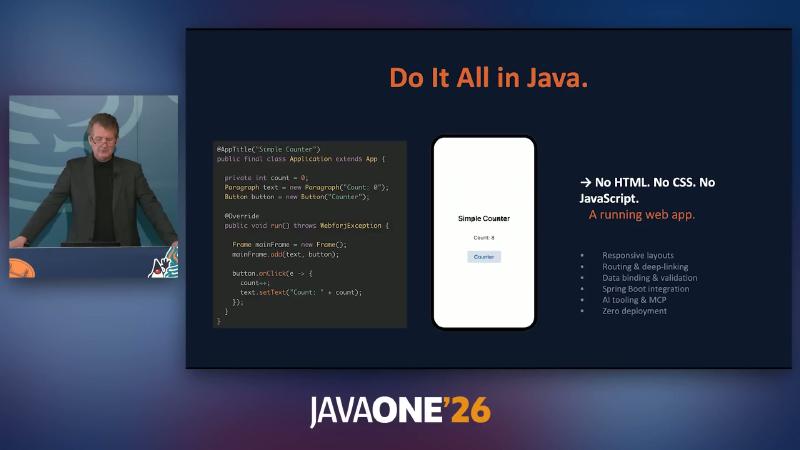
Figure: Slide — Do It All in Java., Application extends App, Button button = new Button("Counter").
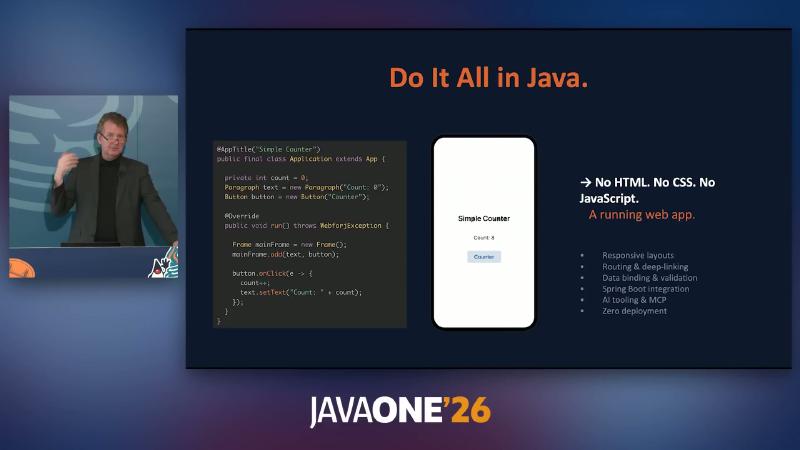
Figure: Same Counter example running, showing Count: 8.
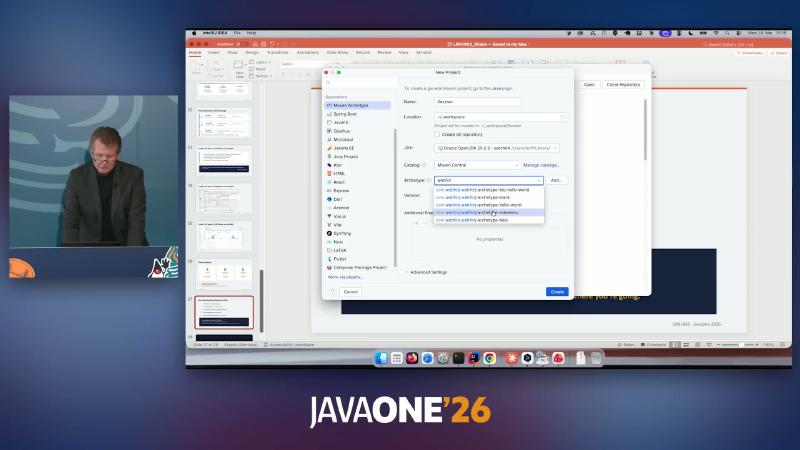
Figure: New Project — webforj-archetype-sidemenu, webforj-archetype-hello-world, webforj-archetype-tabs.
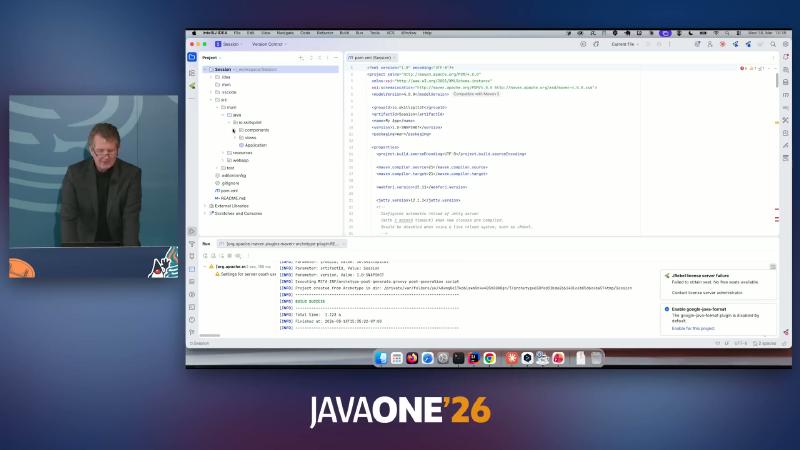
Figure: Generated project — <packaging>war</packaging>, io.skillsplot / Session, Maven structure.
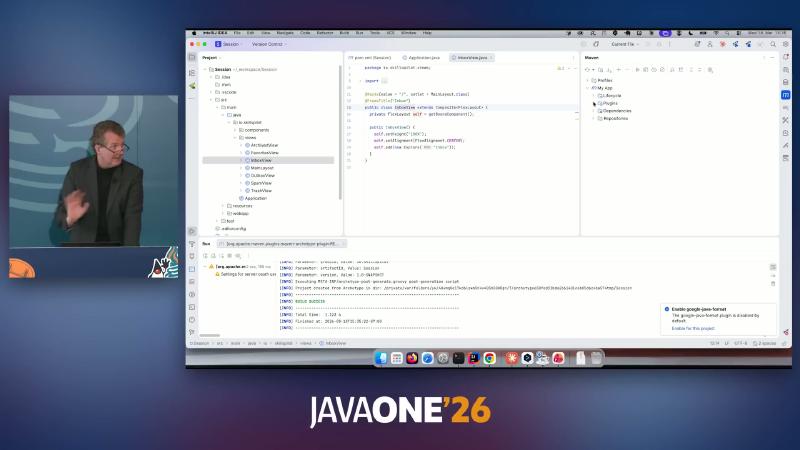
Figure: Archetype view — package io.skillsplot.views, public class InboxView.
Incremental Modernization Roadmap#
Why: Technology choices need pausable stages to avoid “all or nothing” scope creep. The Webswing official framework and webforJ modernization tutorial both describe phased replacement; the speaker adds: low-traffic screens can stay on Webswing long term (official tutorial endpoint tends toward retiring legacy—strategy choice, not contradiction).
Mechanism / constraints:
| Phase | Goal | Typical duration (speaker wording, not SLA) |
|---|---|---|
| 1 Web-enable | Webswing + classpath/mainClass | Days–weeks |
| 2 Hybrid | @Route + WebswingConnector + bidirectional messages | Months |
| 3 Refresh | High-traffic screens native webforJ + reuse service layer | Several months |
| 4 Retain | Low-traffic screens untouched | As needed |
What to do: Appoint an internal champion; pick one painful application for a Webswing PoC; in parallel spin up a webforJ sidebar shell from the Archetype; prioritize by menu telemetry if available. Webswing marketing says “15 minutes” to start; the speaker says “in the browser tomorrow”—treat that as environment ready + small app ideal case; enterprise apps with complex login, printing, multi-module classpath still need weekly integration and regression planning—do not bake into external SLAs.
Common pitfalls: Treating “live tomorrow” as a contract clause (speaker jokes about courtroom liability); skipping CORS/port planning so PoC passes but production stalls.
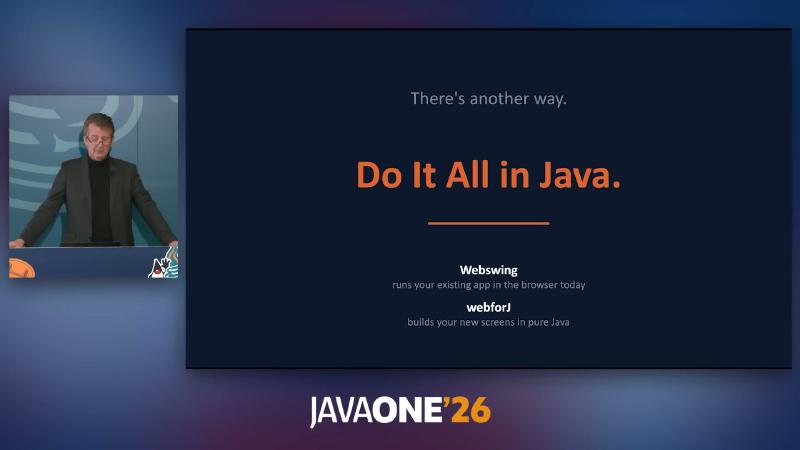
Figure: “Do It All in Java.”—Webswing runs your existing app in the browser today; webforJ builds your new screens in pure Java.
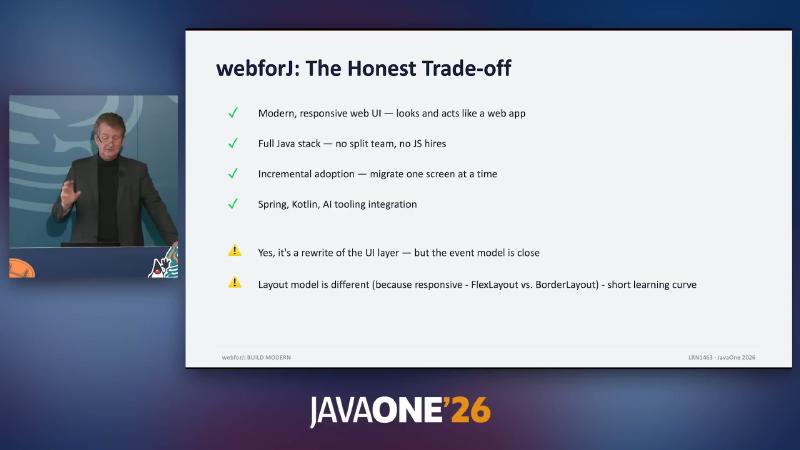
Figure: “webforJ: The Honest Trade-off”—incremental adoption, Spring/Kotlin/AI, and FlexLayout vs BorderLayout.
Case Signal: Prodin and Unverified Boundaries#
Speaker introduction (not independently verified): Dutch ERP vendor Prodin (Patrick Aries), after rejecting low-code (full rewrite + constraints) and Angular/React (multi-stack), chose webforJ; 6 Java developers, ~4 months, 0 lines of JavaScript for the first modules; a 500+ menu Swing MDI still runs on some shop floors. Rejection rationale and numbers are from conference oral testimony—not cross-checked in public case studies found in this research pass.
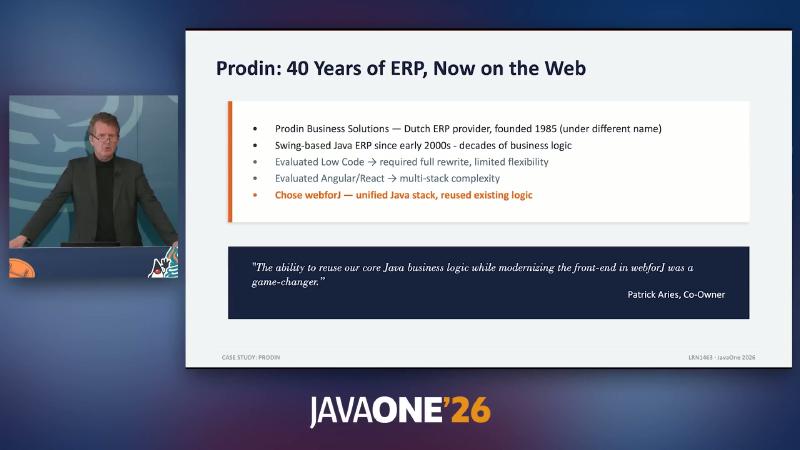
Figure: “Prodin: 40 Years of ERP, Now on the Web”—rejected Low Code and Angular/React, chose webforJ.
Unverified boundaries to preserve in writing:
- Security / SSO / multi-tenancy: integration mentioned only, no in-session configuration
- Concurrent sessions, latency, horizontal scale: no benchmarks; Citrix analogy is speaker opinion
- SEO, mobile: not discussed
- Comparison with Vaadin / Hilla / JSF: speaker says no direct comparison testing (run your own PoC for selection)
- Webswing wire protocol and threading model: no public wire spec
- AWT-layer implementation, same JVM shared ClassLoader: not supported as default by docs
Three Monday-Morning Experiments#
If you own modernization for a legacy Java GUI, defer procurement and run reproducible experiments:
- Download Webswing, follow Quickstart to mount an internal Swing app (classpath + mainClass).
- Use Getting Started to generate an Archetype project,
mvn jetty:runto learnApp/Frame/@Route. - Follow the Webswing modernization tutorial, wire
WebswingConnectorlocally, and compare with the hybrid demo at webswing.webforj.com.
These three steps validate “zero source change to web,” “single-stack new screen development,” and “shell + legacy Canvas coexistence”—more revealing of organizational and architecture constraints than a one-shot selection meeting. If PoC succeeds, discuss Spring Boot (Spring integration) to unify the service layer and whether to keep a separate Webswing process during hybrid; if PoC fails, failure modes surface earlier than “sign a three-year React outsource”—usually EDT thread assumptions, local JNI, or extreme custom painting, not Java the language.
References and Further Reading#
- webforJ documentation home
- webforJ — Getting Started
- webforJ — Client/Server interaction model
- webforJ — Webswing integration overview
- webforJ — Webswing setup and CORS
- webforJ — Webswing bidirectional communication
- webforJ — Incremental modernization tutorial
- webforJ — Routing and deep links
- webforJ — Data binding
- webforJ — Spring integration
- webforJ — Archetype overview
- GitHub — webforj 25.10 Release (Webswing integration)
- Maven Central — webforj version metadata
- Webswing site and zero-change narrative
- Webswing — Modernization framework (Web-Enable / Extend / Facelift / Rebuild)
- Webswing — File handling and JFileChooser mapping