

Production-Ready GenAI with Open Models: LangChain4j Integration Path for Java Teams#
Putting generative AI into an existing Spring service is rarely hard because you cannot get a single ChatCompletion to work. The hard part is whether the same Java code can switch among local Ollama, a team self-hosted OpenAI-compatible endpoint, and Azure AI Foundry managed inference—while turning tool calling, RAG, and basic quality gates into an observable, rollback-friendly pipeline. The sections below are organized by engineering capability blocks: integration layer, local runtime, demo service, RAG and evaluation, capacity and latency, managed migration, and security—claims are tied where possible to LangChain4j documentation, the Ollama API, JEP 444, and reproducible commands; figures and case studies not re-verified in public documentation are labeled speaker opinion.
Demo source is available via aka.ms/opengenai (HTTP 301 to gen-ai-with-open-models). The repository splits scripts into Demo 1 (local inference + tool calling) and Demo 2 (RAG + evaluation) for step-by-step reproduction at JavaOne; for production, separate “it runs” from “it can ship”: the former validates the integration surface, the latter adds persistence, auth, guardrails, and SLOs.
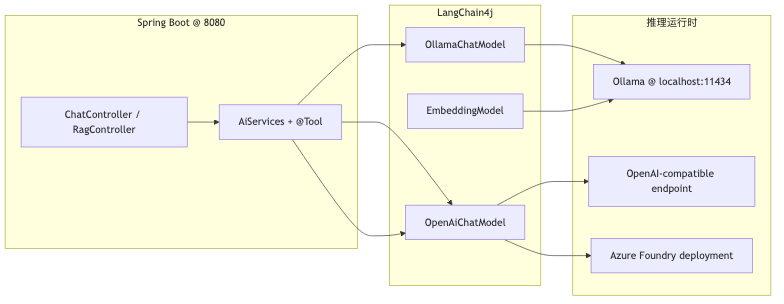
Unified integration layer: LangChain4j and OpenAI-compatible endpoints#
Why#
If a Java team adopts “one SDK per model,” changing endpoints forces business-layer changes. The approach in the talk uses LangChain4j OllamaChatModel, OpenAiChatModel, and the same AiServices, @Tool, EmbeddingModel / EmbeddingStore stack to move Python-style base_url + api_key configuration into Beans. Speaker opinion: when switching among Ollama, vLLM, or the cloud, “business Java changes as little as possible”—in practice you still change Beans such as baseUrl, apiKey, and modelName; it is not zero diff.
Mechanism and constraints#
- Ollama integration defaults to
http://localhost:11434; the OpenAI-compatible path is/v1/chat/completions. @Toolis LangChain4j function calling (Tools tutorial), a different protocol layer from MCP; mixing the concepts leads to wrong architecture boundaries.- The demo repo’s
OllamaConfigusestemperature0.7; draft notes mention0.2for more grounded answers—these do not conflict; they are tunable hyperparameters.
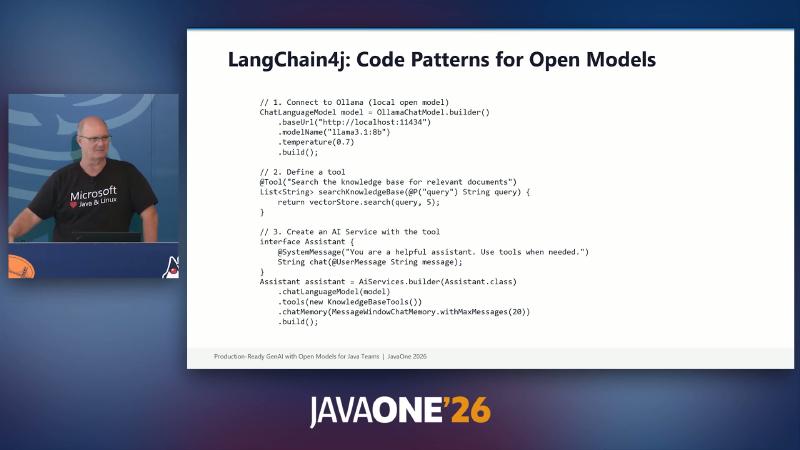
OllamaChatModel.builder(), @Tool, and AiServices.builder.
How to do it#
OllamaChatModel chat = OllamaChatModel.builder()
    .baseUrl("http://localhost:11434")
    .modelName("llama3.1:8b")
    .temperature(0.7)
    .build();
curl http://localhost:11434/v1/chat/completions \
  -H "Content-Type: application/json" \
  -d '{"model":"llama3.1:8b","messages":[{"role":"user","content":"hello"}]}'
Common pitfalls#
- Treating
@Toolas exposing an MCP Server—the two can coexist, but semantics and operational boundaries differ. - Assuming Java business classes stay completely unchanged when switching cloud vendors—at minimum configuration classes and auth headers change.
- Piling long
@SystemMessagetext onAiServicesinterfaces withoutMessageWindowChatMemoryto bound the window—long conversations consume tokens that should remain for RAG context (AiServices tutorial memory components can be enabled as needed).
Local runtime: Ollama and demo model set#
Why#
Before cloud billing and compliance review, local Ollama reproduces latency, quantization, and tool-calling behavior at controlled cost. The demo uses a fixed set: llama3.1:8b (chat), mistral:7b (switchable), nomic-embed-text (embeddings), consistent with the demo README.
Mechanism and constraints#
- CLI
ollama pull/ollama listmap to RESTPOST /api/pullandGET /api/tags(Ollama API). - Official Linux install is
curl -fsSL https://ollama.com/install.sh | sh; subtitleapt-get install ollamawas not verified on the official site. - GPU/VRAM scheduling by Ollama is speaker opinion; quantization labels (e.g. Q4) appear on each model card—there is no universal quality-vs-memory lookup table.
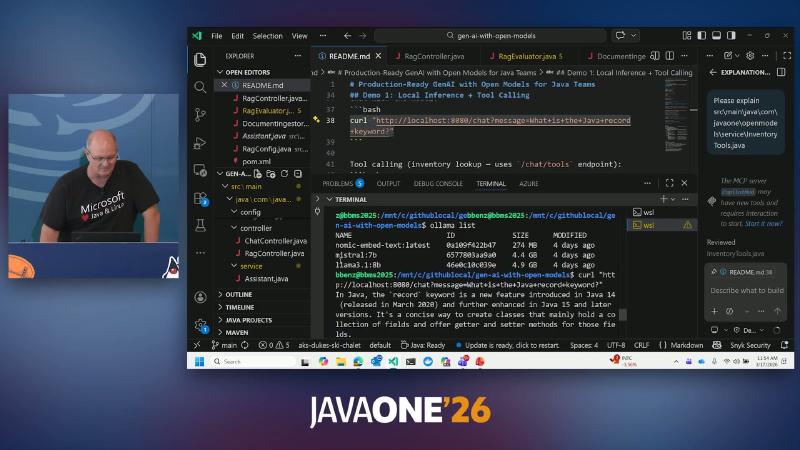
## Demo 1: Local Inference + Tool Calling and Production-Ready GenAI with Open Models for Java Teams.
How to do it#
ollama pull llama3.1:8b
ollama pull mistral:7b
ollama pull nomic-embed-text
ollama list
In application.yml, set ollama.base-url: http://localhost:11434 and align chat-model / embedding-model with the above (application.yml).
Common pitfalls#
- Calling
/ingestwithoutpulling the embedding model—the RAG pipeline fails at the embedding step. - Treating demo
mistral:7bas the production default—re-select using your own benchmarks (see model-selection slide). - Running a 70B full-precision model alongside a large Spring heap on a laptop—even if the JVM does not OOM, the node may swap because Ollama keeps weights resident (speaker opinion: model memory is mostly outside the heap).
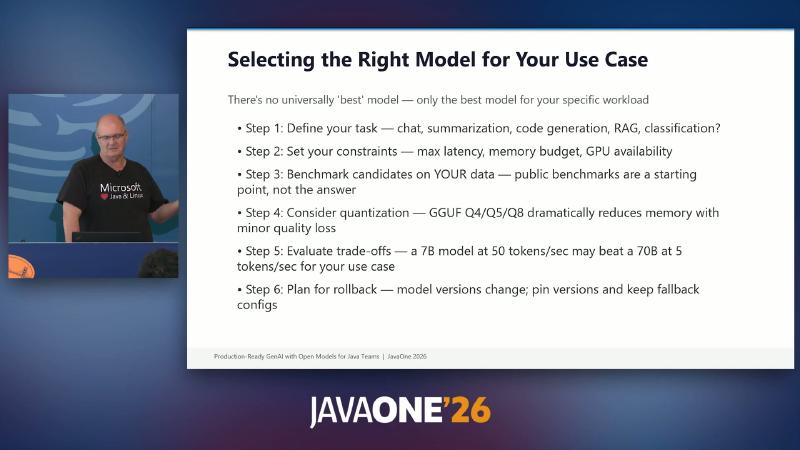
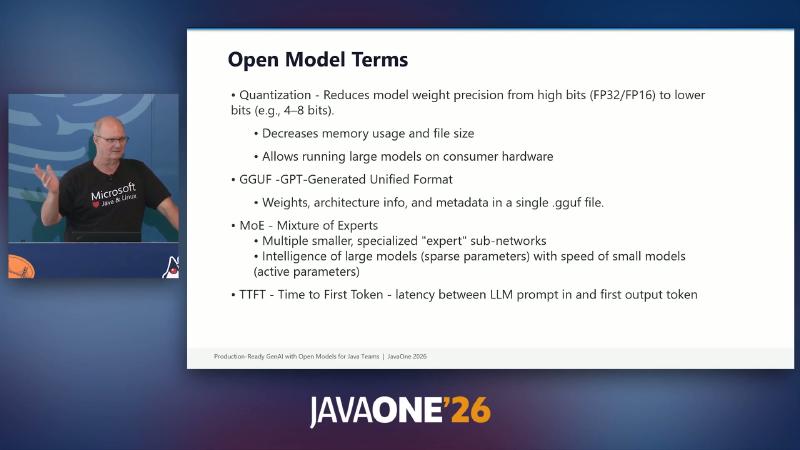
The selection slide also outlines six steps: define task type (chat / RAG / code, etc.) → set latency and memory ceilings → benchmark on your own data → evaluate GGUF Q4/Q5/Q8 quantization → compare whether “7B @ 50 tok/s” or “70B @ 5 tok/s” fits the SLA → pin model versions and prepare rollback config. Public leaderboards are only a first filter; they cannot replace regression on domain data.
Minimal Spring Boot integration#
Why#
A Java 21 + Maven Spring Boot app gives teams a reproducible integration entry: build, start, hit REST with curl, then layer tools and RAG.
Mechanism and constraints#
- pom.xml:
java.version21, Spring Boot 3.4.x. server.port: 8080, entry pointOpenModelsDemoApplication.- OCR
808@is recognition noise; the actual port is 8080.
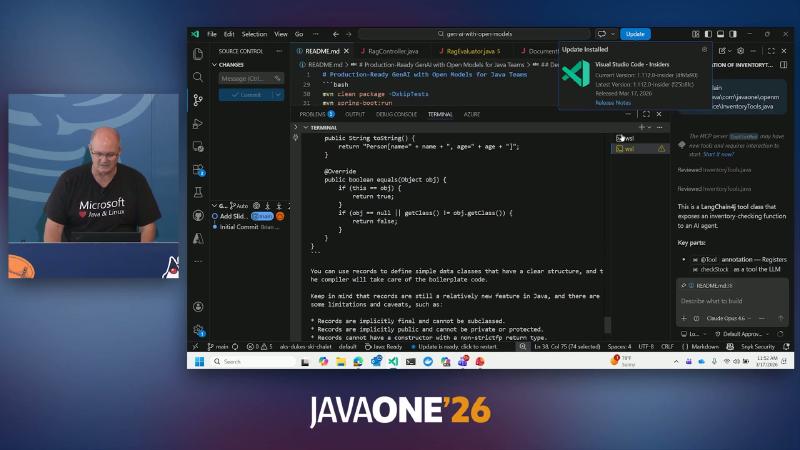
mvn clean package -DskipTests, mvn spring-boot:run.
How to do it#
mvn -q -DskipTests clean package
mvn -q spring-boot:run
curl -sS "http://localhost:8080/chat?message=ping"
Common pitfalls#
- Starting Spring without
ollama serve—LLM calls cannot reach11434. - Running the full demo in CI without reserving GPU/CPU time and model pull duration.
- Treating
-DskipTestsas a long-term strategy—fine for a demo; before production, restore contract tests for controllers and ingest paths.
Tomcat listening on 8080, context path '/', and OCR Started OpenModelsDemoApplication indicate a standard Spring MVC shell, not a standalone CLI; the same JAR can deploy to Kubernetes by pointing ollama.base-url at an in-cluster Service name.
Chat and tool calling: from /chat to /chat/tools#
Why#
Validate plain generation first (/chat), then let the model call deterministic backends when needed (/chat/tools), separating “must check inventory” from hallucination risk.
Mechanism and constraints#
- ChatController:
@GetMapping("/chat"),@Qualifier("chatAssistant")injection,chatAssistant.chat(message). - Tool path:
@GetMapping("/chat/tools")→toolAssistant; InventoryTools uses@Tool+@P("Product SKU"), aMapmock inventory (JDK-21→ 150), not external ERP.
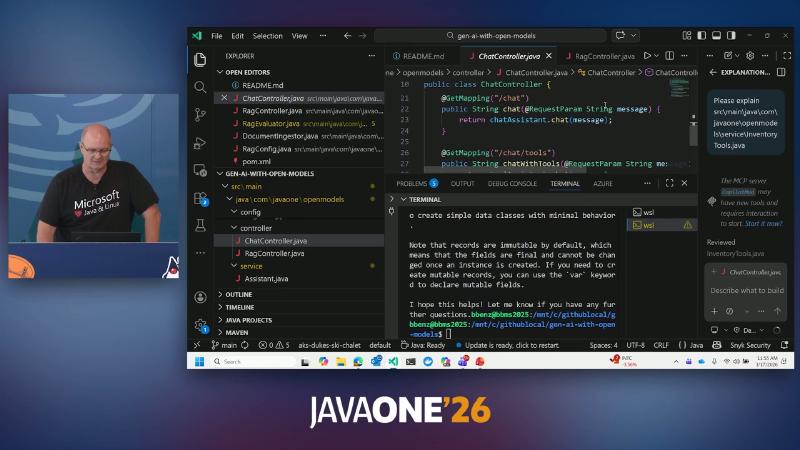
public class ChatController and @GetMapping("/chat").
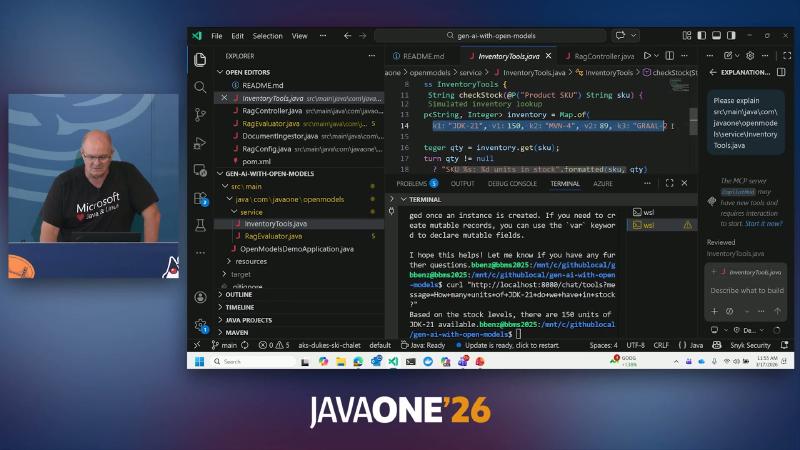
InventoryTools with String checkStock(@P("Product SKU").
How to do it#
curl "http://localhost:8080/chat?message=What+is+the+Java+record+keyword?"
curl "http://localhost:8080/chat/tools?message=How+many+units+of+JDK-21+in+stock?"
@Tool("Look up current stock level for a product by SKU")
String checkStock(@P("Product SKU") String sku) {
  return Map.of("JDK-21", 150).getOrDefault(sku, 0) + " units";
}
Common pitfalls#
- Tools return free text without SKU validation—the model may still invent products that were never queried.
- Stuffing user-controlled instructions into the system prompt without isolation—increases prompt-injection surface (production needs input guardrails; see below).
- Exposing only
/chatfor convenience—inventory, tickets, and pricing questions should route to deterministic backends; the demo separates/chat/toolsand/chatto contrast hallucination with grounded tool results.
InventoryTools returns strings like "SKU %s: %d units in stock".formatted(sku, qty) (OCR shows a formatted fragment), so the model can paraphrase tool output for the user while the data source stays under Java control.
RAG: ingestion, Q&A, and heuristic evaluation#
Why#
Enterprise document Q&A needs answers grounded in sources: chunk, embed, retrieve, then generate; after changing models or chunking, regress with your own golden set instead of eyeballing prompts alone.
Mechanism and constraints#
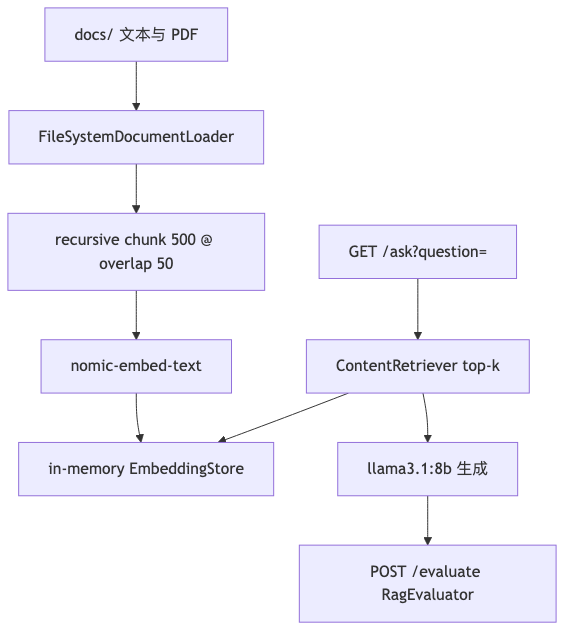
- DocumentIngestor:
FileSystemDocumentLoader,DocumentSplitters.recursive,rag.chunk-size: 500,chunk-overlap: 50,EmbeddingStoreIngestorwrites to an in-memory store. POST /ingestreturnsdocuments_ingested,embedding_model,store(demo uses three sample files underdocs/).GET /askgoes through RagConfigEmbeddingStoreContentRetriever+ragAssistant; for virtual-thread questions, java21-features.txt aligns with JEP 444—facts from documents, phrasing from the LLM.- RagEvaluator: 3
EvalCaseentries;computeFaithfulnessand similar methods are keyword-overlap heuristics (source comment:Simple keyword overlap metric), not industry benchmarks like RAGAS; OCRcontext_precision≈0.27is a single demo run score—not generalizable.
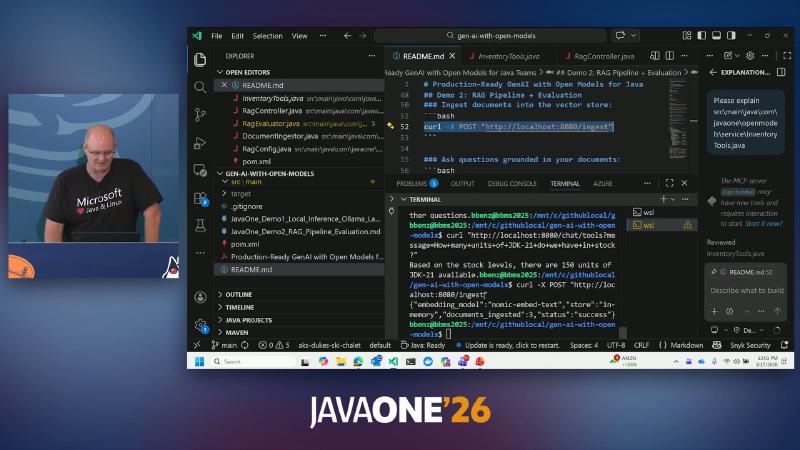
## Demo 2: RAG Pipeline + Evaluation and ### Ask questions grounded in your docume.
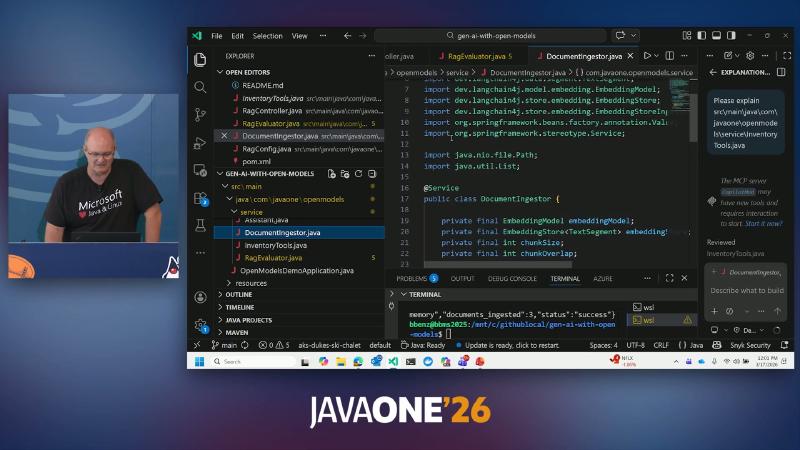
DocumentIngestor.java and import dev.langchain4j.model.embedding.EmbeddingModel.
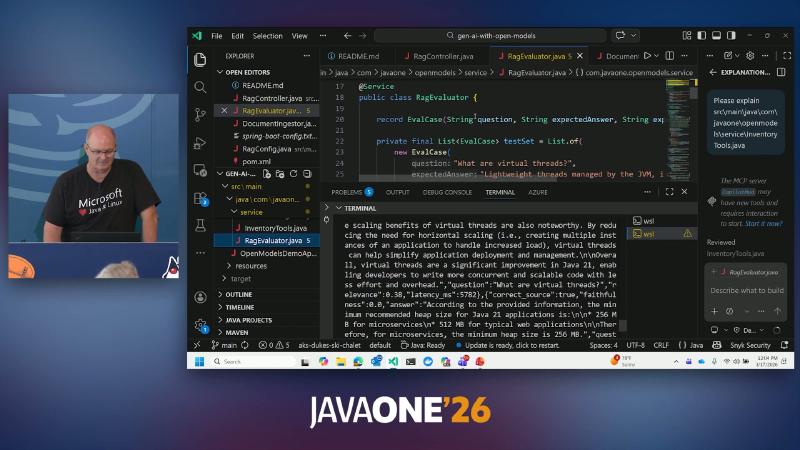
public class RagEvaluator with faithfulness / context precision logic.
How to do it#
curl -X POST "http://localhost:8080/ingest"
curl "http://localhost:8080/ask?question=What+are+virtual+threads+in+Java+21?"
curl -X POST "http://localhost:8080/evaluate"
Common pitfalls#
- Treating demo
/evaluatescores as SLA contract metrics. - Chunks too large dilute context; too small fragment semantics—tune
chunk-size/overlapby document type. - Keeping an in-memory store in production—index lost on restart; use a persistent vector database (not covered in the demo).
- Confusing faithfulness (answer faithful to retrieved chunks) with answer relevance (answer on-topic)—
RagEvaluatorscores both heuristically; for external reporting, use RAGAS, DeepEval, or similar with a fixed dataset version.
Fields from POST /evaluate such as average_latency_ms and source_accuracy suit before/after change gates, not absolute quality promises. After swapping llama3.1:8b for another open-weight model, re-ingest and run evaluate again; check whether faithfulness and context precision move in the same direction.
Capacity, latency, and node planning#
Why#
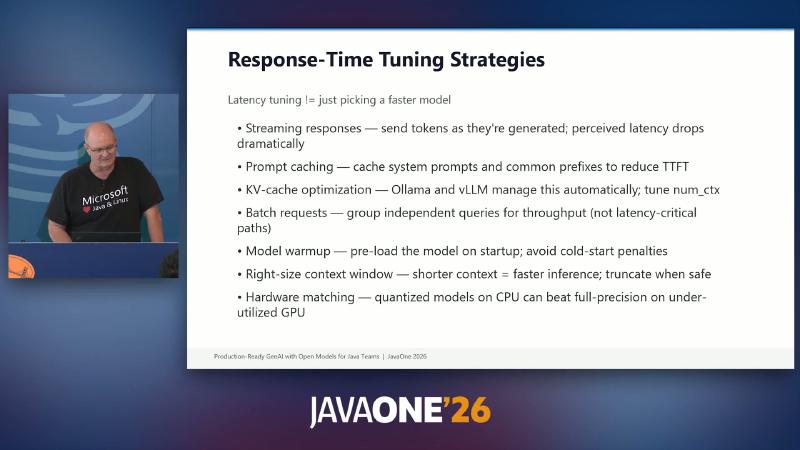
“JVM tuning done” does not mean the node is stable: Ollama model weights stay resident in RAM, usually outside the heap, yet still compete with -Xmx on the same machine; Kubernetes scale-to-zero trades cold-start TTFT (speaker opinion).
Mechanism and constraints#
- Ollama Modelfile parameters
num_ctx,keep_alive; API supportsstream(Ollama API). - Slides list: Streaming, Prompt caching, KV-cache / num_ctx, Batch, Model warmup, Right-size context, Hardware matching (quantized CPU vs full-precision GPU).
How to do it#
# Capacity sketch (single-sided ops, speaker opinion)
Node RAM 128Gi − JVM -Xmx 24Gi − Ollama resident ~60Gi − OS/cache ≈ headroom
@Component
class LlmWarmup implements ApplicationRunner {
  @Override
  public void run(ApplicationArguments args) {
    chatAssistant.chat("ping");
  }
}
Common pitfalls#
- Looking only at tokens/s, not TTFT—interactive chat is more sensitive to the first token.
- Blindly increasing
num_ctx—longer context slows each inference (official parameter docs document the trade-off). - No streaming while the front end waits for full JSON—perceived “stall” often comes from time-to-first-token, not total latency; LangChain4j Ollama docs include streaming examples combinable with Spring
SseEmitteror WebFlux.
MoE (Mixture of Experts) models appear on slides alongside quantization and TTFT: large total parameter count but only a subset of experts active per step, useful when latency budget allows higher capability ceilings. Speaker opinion: MoE ops complexity on managed Foundry NIM vs self-hosted vLLM exceeds dense 7B/8B; include elasticity and rollback in total cost when selecting.
Managed migration: Azure AI Foundry and OpenAI-compatible REST#
Why#
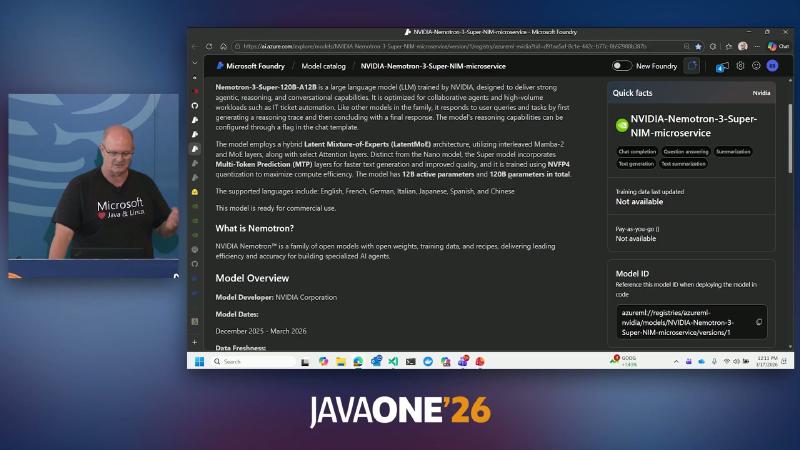
After local validation, the same LangChain4j call surface can target open-weight deployments on Azure AI Foundry (demo slide: NVIDIA Nemotron-3-Super-NIM-microservice), with the platform handling GPU and elasticity (ACA/AKS/KEDA are general Azure capabilities, not verified against the demo repo).
Mechanism and constraints#
- Azure chat completion shape:
POST https://{endpoint}/openai/deployments/{deployment-id}/chat/completions?api-version=...(Azure OpenAI REST);api-versionmust match the deployment page—draft2024-05-01-previewmay differ from current Learn examples (e.g.2024-10-21). - Java side:
OpenAiChatModel(custombaseUrl) or AzureOpenAiChatModel (deploymentName). - Slides/OCR describe Nemotron 120B total / 12B active, LatentMoE, MTP, NVFP4—not fully re-verified from Microsoft Learn in this write-up; treat portal model cards as authoritative. Hugging Face repo links for the same name returned 404 during verification; hard-coding parameter counts is risky.
How to do it#
curl "$FOUNDRY_ENDPOINT/openai/deployments/$DEPLOYMENT/chat/completions?api-version=$API_VERSION" \
  -H "api-key: $AZURE_API_KEY" \
  -H "Content-Type: application/json" \
  -d '{"messages":[{"role":"user","content":"hello"}]}'
OpenAiChatModel.builder()
  .baseUrl(System.getenv("FOUNDRY_BASE_URL"))
  .apiKey(System.getenv("AZURE_API_KEY"))
  .modelName(System.getenv("DEPLOYMENT_NAME")) // use deployment name
  .build();
Common pitfalls#
- Using a Hugging Face repo id as the Foundry deployment name.
- Ignoring the
api-versionquery parameter—Azure versioning differs from bare local Ollama (see table below). - Assuming “cloud means no open-weight compliance work”—Foundry emphasizes model provenance (speaker opinion: compared with picking weights on Hugging Face you still self-assess license and safety); legal and data residency need separate review.
The demo has no Foundry Spring profile branch; a common production pattern is application-local.yml → Ollama, application-prod.yml → FOUNDRY_BASE_URL and AZURE_API_KEY, with canary traffic on the same Assistant interface comparing latency and cost.
| Endpoint family | Versioning |
|---|---|
| Azure OpenAI / Foundry | URL query api-version |
Ollama native /api/* | Docs do not require api-version |
Ollama OpenAI-compatible /v1/* | Client shape compatible with OpenAI |
Security layers for open models#
Why#
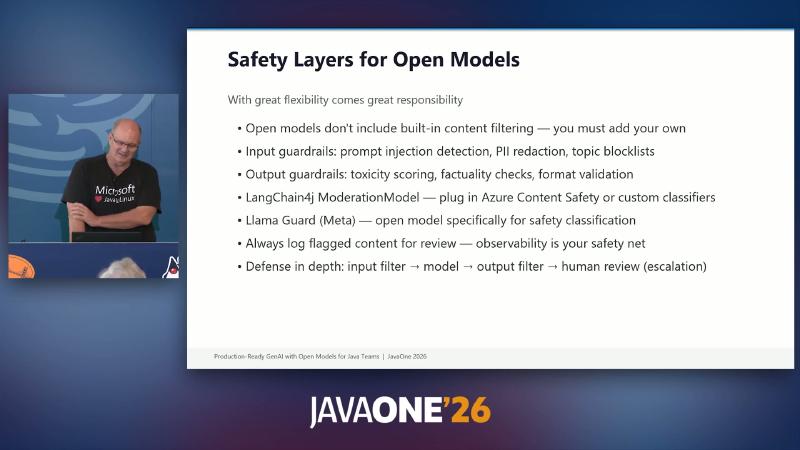
Weights pulled from Hugging Face and similar channels usually lack the mandatory content filtering of commercial APIs; exposing unreviewed models directly to end users leaves compliance and brand risk with the application owner.
Mechanism and constraints#
- Slides recommend: Input guardrails (injection, PII, topic blocklists) → Model → Output guardrails (toxicity, factuality, format) → Human review.
- LangChain4j provides ModerationModel and
OpenAiModerationModel; the demo repo has no guardrail controller—a production extension. - Llama Guard and similar local options exist; demo code does not verify them.
How to do it#
public String safeChat(String user) {
  if (moderation.isViolating(user)) {
    throw new ResponseStatusException(HttpStatus.BAD_REQUEST);
  }
  String out = llm.generate(user);
  return moderation.isViolating(out) ? "[blocked]" : out;
}
Common pitfalls#
- Moderation only on output—jailbreak prompts are already in model context.
- No flagged logging and human escalation queue—safety layers are not operable.
- Treating OpenAI Moderation API as the only option—offline or sovereign-cloud scenarios can use other
ModerationModelimplementations or Llama Guard–style local classifiers, but you maintain model versions and false-positive rates yourself.
The difference between open weights and managed APIs: filtering responsibility defaults to the application. Slide input/output guardrails and LangChain4j ModerationModel engineer the same idea—intercept before generation, intercept before return, route suspicious samples to human review, not only a front-end disclaimer.
Closing: resources and evidence boundaries#
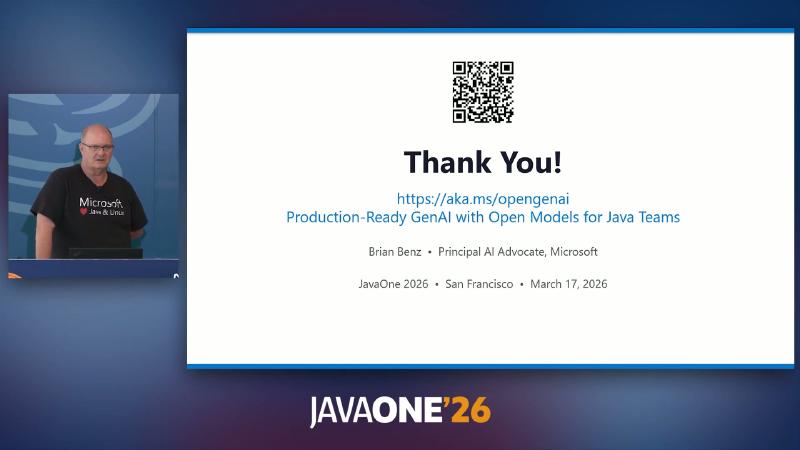
https://aka.ms/opengenai and topic “Production-Ready GenAI with Open Models for Java Teams”.
Verified (against repo and official docs): LangChain4j + Ollama integration pattern; demo endpoints /chat, /chat/tools, /ingest, /ask, /evaluate; JEP 444 consistency with sample documents; Azure REST shape and LangChain4j dual integration classes.
Speaker opinion or not re-verified: AT&T-style cost-reduction cases, Foundry catalog model counts, 128Gi capacity sketch, Nemotron exact architecture parameters in Learn body text, production guardrail SLAs.
If you have Demo 1/2 running locally, typical next steps are: persistent vector store, replace RagEvaluator heuristics with real benchmarks, pick a quantization tier against node RAM budget, and canary on Foundry using portal api-version. The core benefit of the path is making the “model endpoint” swappable configuration, not hard-coded URLs scattered across controllers.
References and further reading#
- Open GenAI demo materials (aka.ms)
- gen-ai-with-open-models demo repository
- LangChain4j documentation home
- LangChain4j Ollama integration
- LangChain4j Tools (function calling)
- LangChain4j RAG tutorial
- LangChain4j Azure OpenAI integration
- Ollama model library
- Ollama OpenAI compatibility
- Ollama HTTP API (GitHub)
- Ollama Modelfile parameters
- JEP 444: Virtual Threads
- Microsoft Foundry documentation
- Azure OpenAI REST API reference
- Spring Boot 3.4 reference documentation