

Demystifying Spring Boot with Spring Debugger: The Real Chain of Properties, Beans, and Transactions#
Spring Boot stacks object lifecycle, configuration merging, conditional assembly, and AOP proxies on top of one another—so logs often end with a single line: “started successfully.” Experienced engineers know the problem usually sits at one link in the startup chain, but what is missing is a way to align “the value written in a file” with “the value the container actually uses,” and to see bean definitions, condition evaluation, and proxy boundaries clearly—without stuffing ApplicationContext into business classes.
IntelliJ’s Spring Debugger folds that inspection into breakpoint sessions: Spring Properties beside Evaluate Expression; the Beans tab separating loaded from unloaded definitions; configuration inlays showing runtime overrides. The sections below are organized by mechanism—properties are finalized in the Environment phase, beans fork between definition and instantiation, transactions take effect at proxy boundaries—and use class names from the Terminator-themed sample as anchors (speaker opinion: the puzzles are for teaching; do not adopt them wholesale as team standards). If you maintain Spring Boot 3.x, the EPP registration key may be org.springframework.boot.env.EnvironmentPostProcessor; Boot 4 migrates to org.springframework.boot.EnvironmentPostProcessor—follow the Javadoc for your version.
Debug entry point: Spring Properties and “who overwrote this key”#
Why#
application.properties, application-prod.properties, command-line arguments, and environment variables can all coexist. Teams that only compare YAML literals often misjudge “prod always overrides base” or “the command line always wins”—while Externalized Configuration also allows EnvironmentPostProcessor to insert a higher-priority PropertySource before context refresh.
Mechanism and constraints#
Boot documentation states that file-based sources have a fixed order and that command line properties always take precedence over file-based property sources. But MutablePropertySources.addFirst(...) places a new source at highest priority (Framework Javadoc). The “final value” must come from the runtime Environment, not from whichever file layer you voted for in a quiz.
At a breakpoint, IntelliJ shows the resolved value via Evaluate Expression → Spring Properties; Review the current configuration explains that inlays can show override relationships and Navigate to the property redefinition—jumping to the code that rewrote the value, not only an application-*.properties file.
How to#
After SpringApplication.run returns, or at any paused breakpoint:
// Evaluate Expression → choose Spring Properties from the right menu → enter the key
// e.g. terminator.main.mission
Example multi-profile file layout (multi-environment naming consistent with demo OCR):
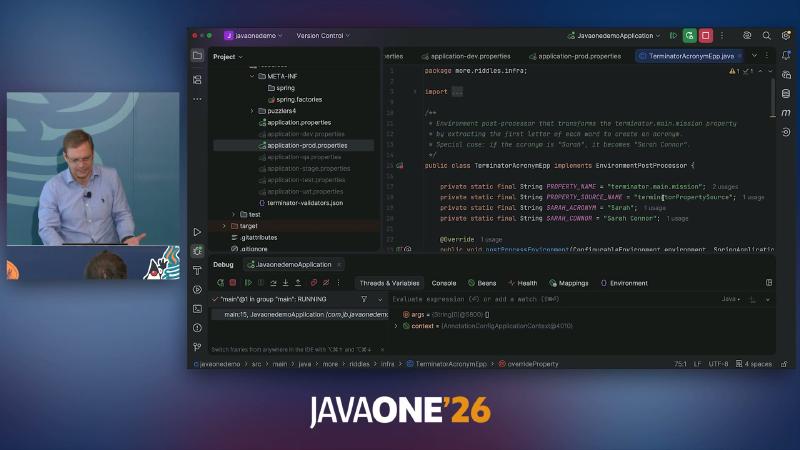
application-dev.properties, application-prod.properties, and terminator-validators.json on screen together—configuration sources are not a single base file.
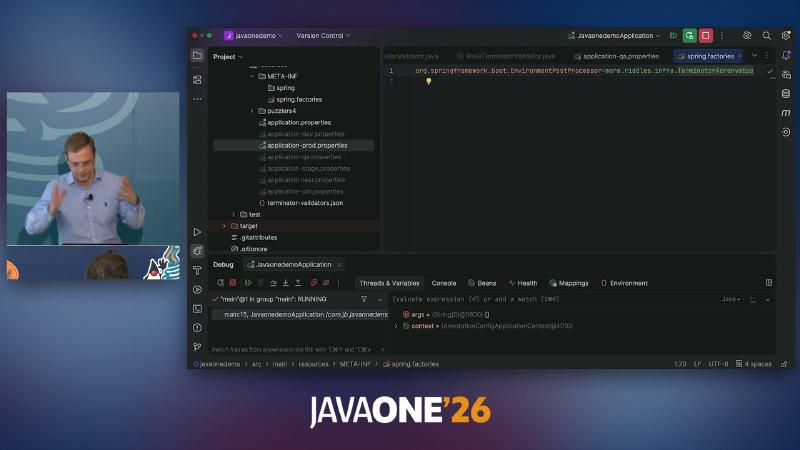
main of JavaonedemoApplication; spring.factories registers EnvironmentPostProcessor; Debug window shows Spring-specific tabs such as Beans / Environment.
The property puzzle (terminator.main.mission in application.properties, application-prod.properties, an environment variable, and the command line) is easy to answer wrong in a poll: do not guess from “prod file” or “command line” alone. When demo logs show Sarah Connor, suspect EPP immediately—not a failed profile override (see next section).
Common pitfalls#
- Replacing the result in Spring Properties with “common sense” priority rules.
- Assuming Navigate only opens properties files; custom EPP
postProcessEnvironmentis the real jump target. - Opening only the Actuator
/envendpoint without observing intermediate state at the earliest breakpoint before EPP runs (if Actuator is off, Spring Properties is a lighter alternative).
EnvironmentPostProcessor: Environment finalized before the bean factory#
Why#
“Config says A, logs say B” problems belong before ApplicationContext refresh. Boot 4.x EnvironmentPostProcessor runs prior to the application context being refreshed to merge property sources or change values programmatically.
Mechanism and constraints#
Built-in and custom EPPs are ordered via Ordered / @Order. Demo TerminatorAcronymEpp reads terminator.main.mission, builds an acronym with special rules (e.g. when the acronym is Sarah, become Sarah Connor), then writes back via environment.getPropertySources().addFirst(propertySource)—consistent with official addFirst semantics.
Registration (common Boot 3.x key; Boot 4 package may move—check Javadoc):
# META-INF/spring.factories
org.springframework.boot.env.EnvironmentPostProcessor=\
  more.riddles.infra.TerminatorAcronymEpp
public class TerminatorAcronymEpp implements EnvironmentPostProcessor {
  private static final String PROPERTY_NAME = "terminator.main.mission";
  @Override
  public void postProcessEnvironment(ConfigurableEnvironment env, SpringApplication app) {
    String mission = env.getProperty(PROPERTY_NAME);
    // Demo logic: acronym + rules → new PropertySource → addFirst
  }
}
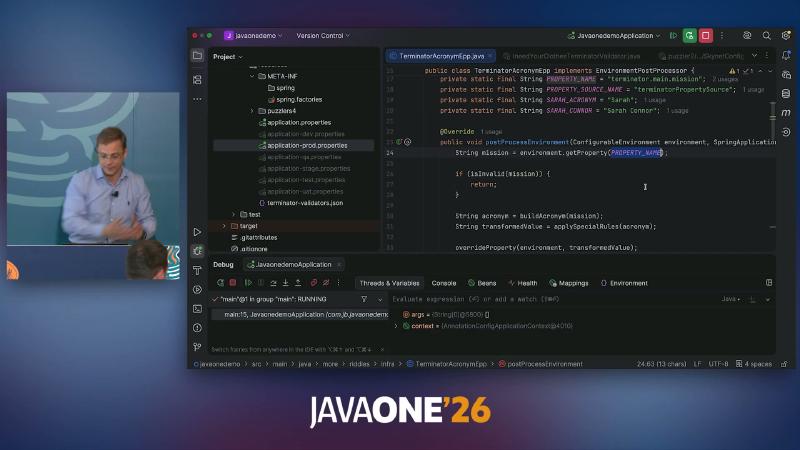
TerminatorAcronymEpp implements EnvironmentPostProcessor, PROPERTY_NAME = "terminator.main.mission".
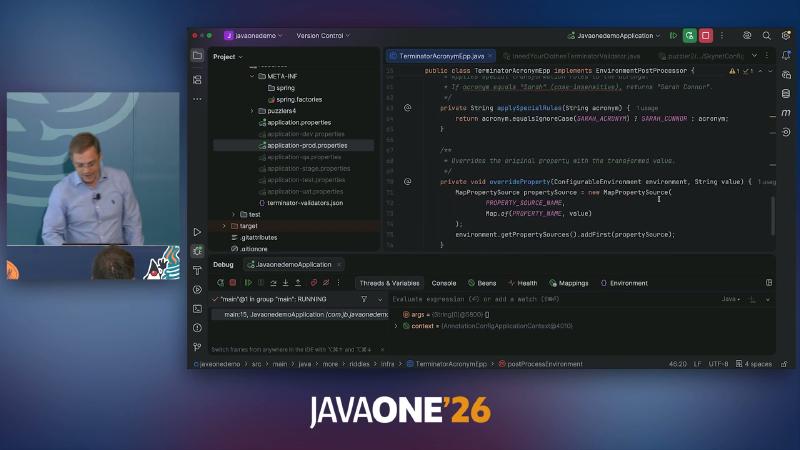
Sarah (case-insensitive).
When debugging, align three evidence chains: FQCN in spring.factories (or imports) → EPP source addFirst / rewrite rules → final string in Spring Properties. Demo comment: “Environment post-processor that transforms the terminator.main.mission property,” matching narration that built-in EPPs run first and custom ones follow (speaker opinion: built-in processor count is on the order of a dozen; exact lists vary by Boot version—do not memorize tables, just know another layer exists).
Common pitfalls#
- Trying to change
Environmentafter beans are created—too late. - Insisting “command line always wins” after EPP—
addFirstcan outrank command line too (coexisting mechanisms, not a doc contradiction). - Treating demo output
Sarah ConnorfromTerminatorAcronymEppas framework default behavior.
Component scanning, conditional assembly, and bean state in the IDE#
Why#
@ComponentScan decides candidate components; Classpath Scanning states that a candidate must match filters and have a corresponding bean definition registered—not every candidate is instantiated. @Conditional / @ConditionalOnProperty must match before definition registration.
Mechanism and constraints#
Switching @ComponentScan(basePackages = "puzzler2") changes the scan list, but when a profile or condition fails, the IDE may list types without a runtime bean (speaker opinion: static navigation and runtime wiring can diverge).
IntelliJ — Review loaded beans: green = loaded, transparent = not loaded, yellow = mock. At a breakpoint, the container beats guessing beans.
@SpringBootApplication
@ComponentScan(basePackages = "puzzler2") // demo switches among puzzler1/2/3
public class JavaonedemoApplication { }
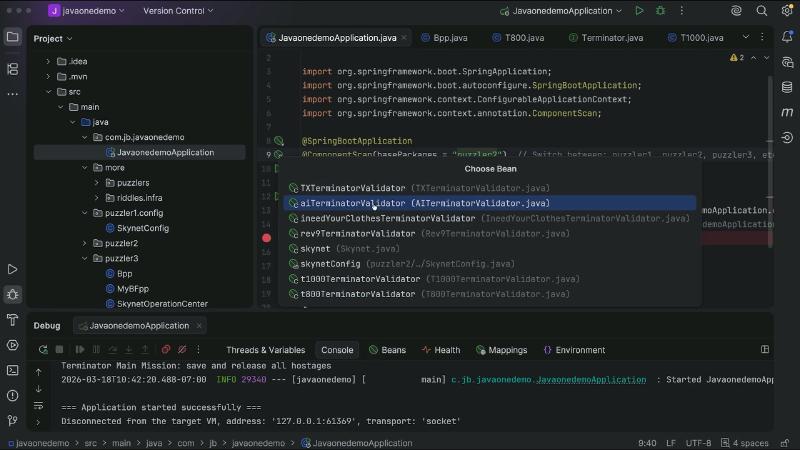
SpringApplication.run and === Application started successfully === together—after changing scan packages you verify runtime outcome, not only the project tree.
Common pitfalls#
- Equating every
@Componentvisible in the Project view with “there must be a singleton bean.” - Skipping Spring Properties to confirm condition properties are actually
true.
@ConditionalOnProperty and legacy XML primary: two definition paths#
Why#
When debugging “why isn’t the implementation with @ConditionalOnProperty the one injected,” check both the condition annotation and XML / @ImportResource for duplicate bean names.
Mechanism and constraints#
@ConditionalOnProperty: by default missing attributes do not match; with havingValue = "true" the property must exist and match. If the condition fails, that component definition is not registered.
Demo IneedYourClothesTerminatorValidator:
@ConditionalOnProperty(
    name = "terminator.model.ineedyourcloses.enabled",
    havingValue = "true")
@Component
public class IneedYourClothesTerminatorValidator implements TerminatorValidator { }
Spring Properties shows no enable key, so the scan path should not produce that BeanDefinition; if legacy XML still declares the same bean with primary="true", injection picks the primary candidate—independent of @Conditional on the class (consistent with official condition semantics; XML details follow the demo repo).
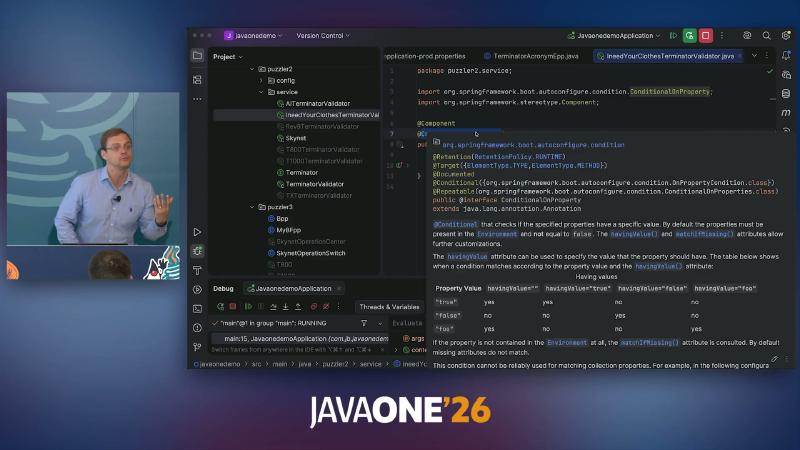
@ConditionalOnProperty and @Component on a validator in package puzzler2.service.
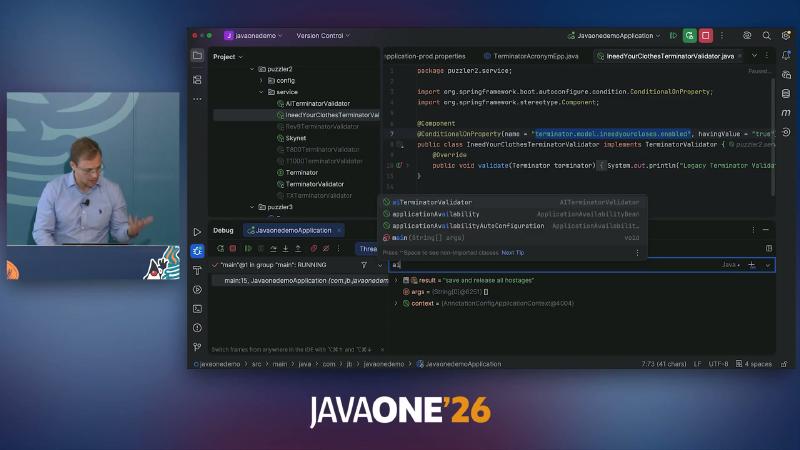
application-prod.properties and validator source on screen.
Common pitfalls#
- Reading annotations only—never opening Beans or
getBeanDefinitionfor a second source. - Assuming
@Conditionalon@Component“turns off” a bean already registered in XML.
Evaluate Expression: read BeanDefinition in a debug session#
Why#
Temporary @Autowired ApplicationContext or logging pollutes code. Spring Debugger exposes all properties and beans in expressions, even when not in the current execution context.
Mechanism and constraints#
From a visible ConfigurableApplicationContext context you can reach BeanFactory and inspect depends-on, bean names, and actual field injection types. IntelliJ docs do not literally list getBeanDefinition("skynet"), but that API is standard on ConfigurableListableBeanFactory (reasonable inference, not a verbatim IntelliJ guarantee).
// At breakpoint (context must be in scope):
context.getBeanFactory().getBeanDefinition("skynet");
// Or on a field: skynet.getTerminatorValidator().getClass().getName()
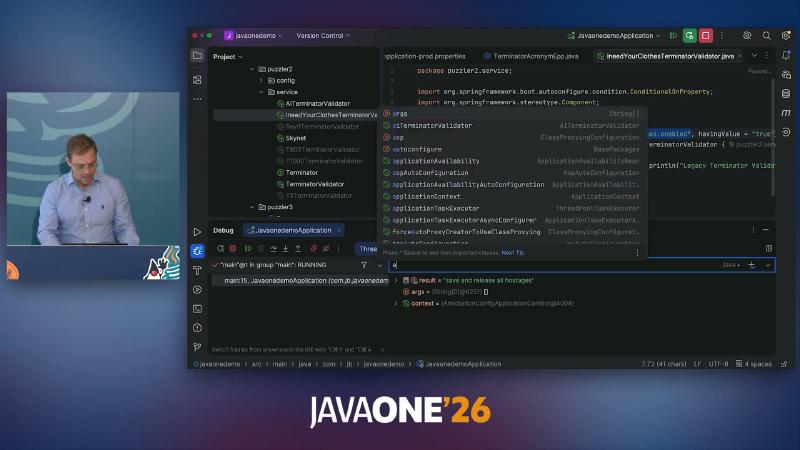
main thread RUNNING; project tree lists several TerminatorValidator implementations to compare injection.
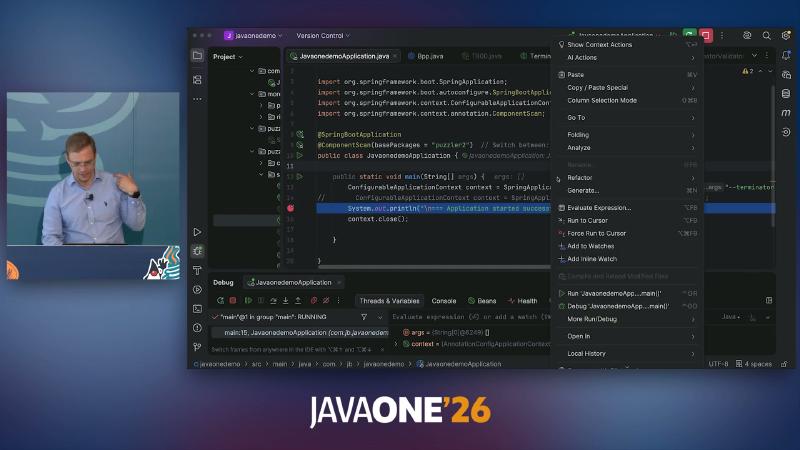
Evaluate Expression... alongside SpringApplication imports.
Common pitfalls#
- Relying only on Variables pane field snapshots, not definition-time
primary/depends-on. - Blaming Spring when evaluation fails without a paused frame that contains
context.
List<T> injection: explicit @Bean List vs collect-by-type#
Why#
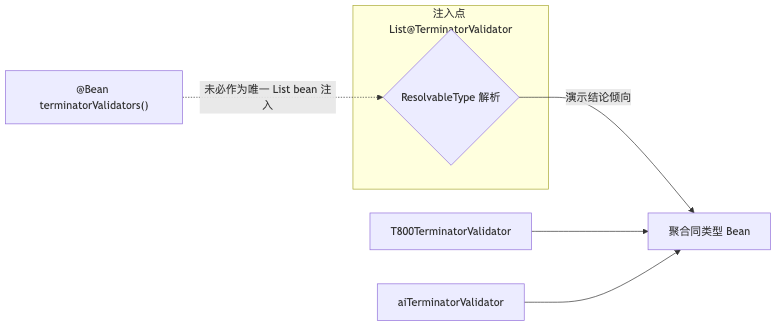
When both @Bean List<TerminatorValidator> and several TerminatorValidator implementations exist, the List in Skynet’s constructor is not obvious. Framework default for collection injection: injecting into List<T> aggregates beans of that type in the container (Using @Autowired).
Mechanism and constraints#
The talk’s puzzle options include: only Rev9 (explicit List bean), T800+AI (individual beans), all three, or an exception. The speaker says behavior differed from some audience intuition before Spring Boot 3.3, and after 3.3 the demo trends toward “collect validators by type” (speaker opinion; this article could not independently verify Boot 3.3 release notes—validate upgrades with integration tests).
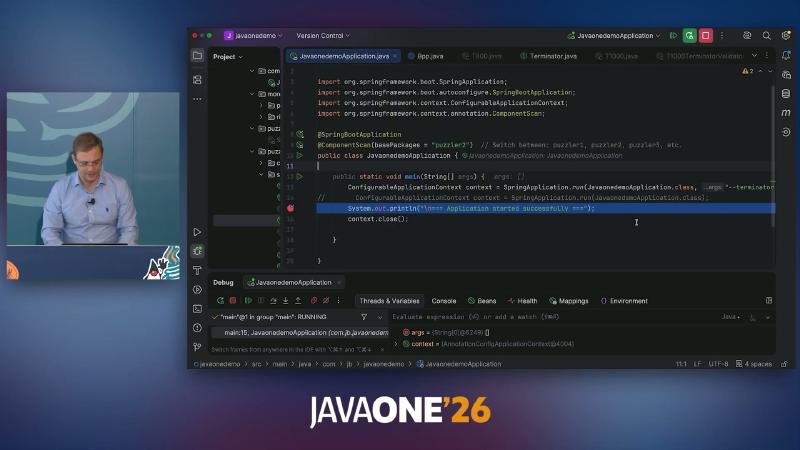
context = {AnnotationConfigApplicationContext@...} with SpringApplication.run(JavaonedemoApplication.class, ..args on screen.
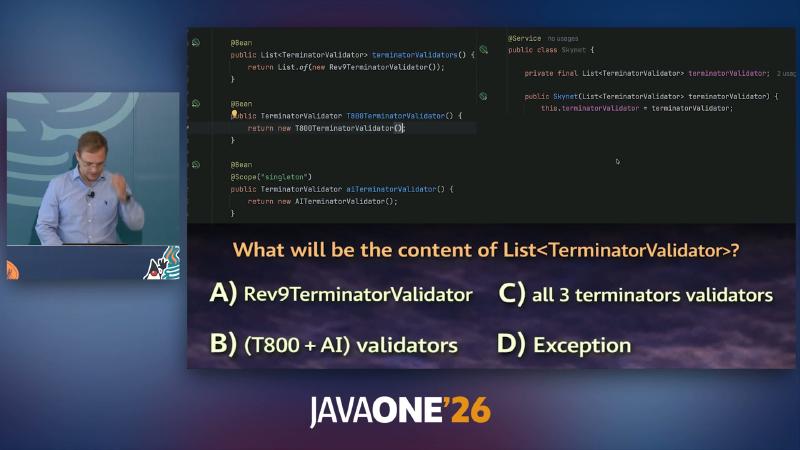
List<TerminatorValidator> contains—options include Rev9, T800+AI, all three, or Exception.
How to#
Breakpoint after Skynet construction:
terminatorValidator.size();
terminatorValidator.stream().map(Object::getClass).toList();
Common pitfalls#
- Assuming
@Bean List.of(new Rev9...)is always injected verbatim. - Copying old puzzle answers without checking Boot minor version.
Spring Framework 7 BeanRegistrar: dynamic registration at definition time#
Why#
When validator lists come from JSON and ops carries class names in config, Class.forName plus programmatic registration beats dozens of hand-written @Bean methods; package refactors surface as startup ClassNotFoundException.
Mechanism and constraints#
Programmatic Bean Registration (Framework 7): @Import a class implementing BeanRegistrar; register(BeanRegistry, Environment) runs before bean instances exist. BeanRegistry.Spec supports order, primary, prototype, lazyInit, description, etc.; current Javadoc has no qualifier(...)—the speaker notes qualifiers still rely on @Qualifier on the class (aligned with the API surface; speaker summary).
public class TerminatorValidatorRegistrar implements BeanRegistrar {
  @Override
  public void register(BeanRegistry registry, Environment env) {
    for (var v : loadConfiguration().getValidators()) {
      Class<?> clazz = Class.forName(v.getClassName()); // typo → startup failure
      registry.registerBean(v.getBeanName(), clazz,
          spec -> {
            if ("prototype".equalsIgnoreCase(v.getScope())) spec.prototype();
            spec.order(v.getOrder());
          });
    }
  }
}
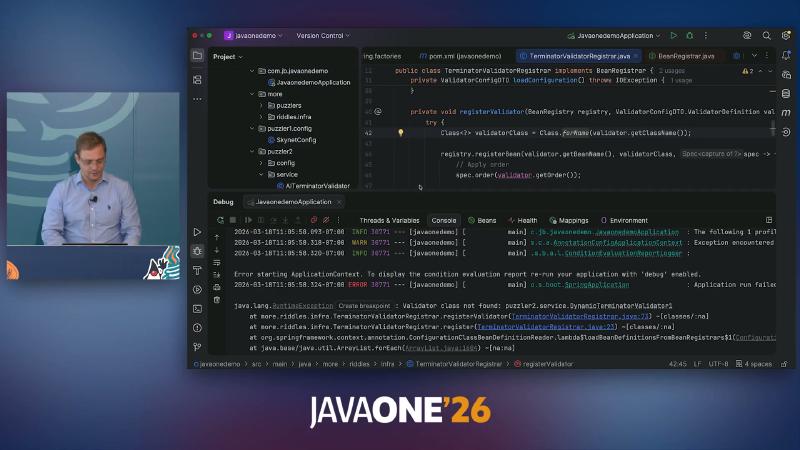
TerminatorValidatorRegistrar implements BeanRegistrar, loadConfiguration() loads external config.
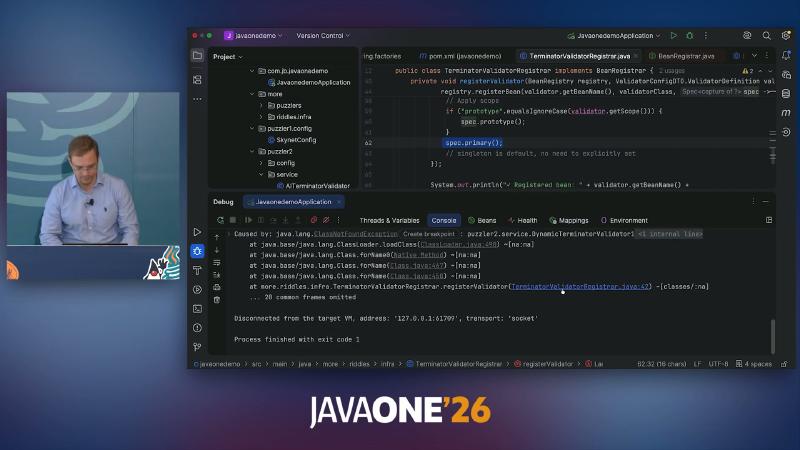
registerValidator(BeanRegistry registry, ValidatorConfigDTO.ValidatorDefinition ...) visible.
On startup failure, add --debug for the condition evaluation report (standard Boot practice; demo console OCR shows Beans / Health / Mappings / Environment tabs).
Common pitfalls#
- Trying to “backfill” a singleton with Registrar after beans are instantiated.
- Expecting JSON FQCNs to update automatically when the IDE refactors packages.
Startup timeline: pin the problem to the right phase#
Why#
Explaining property sources with a BeanPostProcessor, or transaction proxies with an EPP, misplaces the issue. For teaching, startup can be split into four coarse phases (synthetic model; Spring has no single official diagram with this exact ordering—each phase has separate documentation; see P09 verification notes).
Mechanism and constraints#
| Phase | Typical actions | Authoritative anchor |
|---|---|---|
| EnvironmentPostProcessors | Merge/rewrite PropertySources | Boot EnvironmentPostProcessor Javadoc |
| BeanRegistrar / definition registration | Register BeanDefinition, no instances | Framework 7 programmatic registration |
| BeanFactory instantiation | Create singleton / prototype | Bean lifecycle docs |
| BeanPostProcessor | Enhance before/after init, AOP proxies | factory-extension |
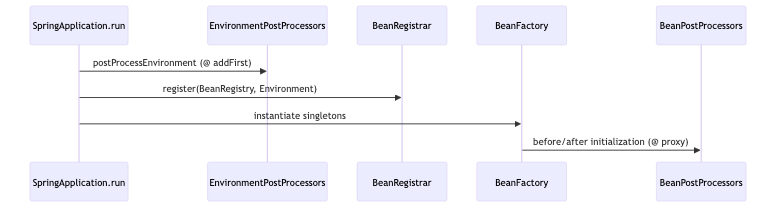
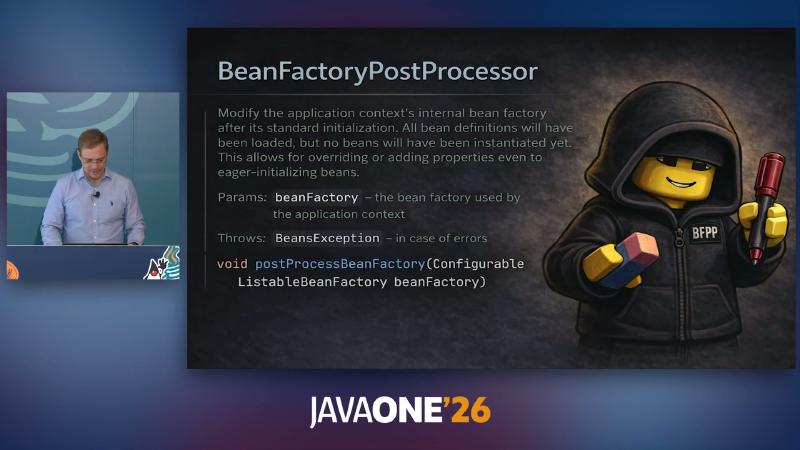
BeanFactoryPostProcessor—modify bean definitions before instantiation (distinct from BPP phase).
Common pitfalls#
- Confusing BeanFactoryPostProcessor (definitions) with BeanPostProcessor (instances).
- Inferring EPP order from a refreshed context in the debugger without reading the
spring.factoriesregistration list.
Prototype scope and destroy callbacks: don’t put @PreDestroy on the wrong scope#
Why#
Multiple-choice puzzles often ask whether @PreDestroy on a prototype runs on context.close(). Assuming every scope shares one destroy chain leaves prototype resources leaking.
Mechanism and constraints#
Prototype scope: Spring does not manage the complete lifecycle; configured destruction lifecycle callbacks are not called; client code must clean up. @PostConstruct still runs at creation; @PreDestroy is reliably meaningful mainly for singletons (matches talk conclusion).
@Component @Scope("prototype")
class T800 {
  @PostConstruct void init() { }
  @PreDestroy void shutdown() { /* do not expect container to call on close */ }
}
Common pitfalls#
- Using
context.close()to verify prototype@PreDestroy. - Treating movie trivia as container behavior.
Transactions and self-invocation: REQUIRES_NEW does not survive this.save()#
Why#
@JavaOneTransactionalService combines @Service with class-level @Transactional(REQUIRED, timeout=10000); save is annotated REQUIRES_NEW. If saveAll calls save directly inside the class, without the proxy, method-level propagation does not apply.
Mechanism and constraints#
Spring documentation: self-invocation does not lead to an actual transaction—even if the invoked method is @Transactional. External entry through the proxy into saveAll starts the outer REQUIRED transaction; internal this.save() has no new transaction; if the outer rolls back on an exception, the demo conclusion is Nothing will be saved (simplified talk scenario; full analysis still needs rollbackFor and exception propagation).
@Retention(RetentionPolicy.RUNTIME)
@Service
@Transactional(propagation = Propagation.REQUIRED, timeout = 10_000)
public @interface JavaOneTransactionalService {}

@JavaOneTransactionalService
public class TerminatorTalkingModule {
  public void saveAll() {
    save(record); // self-invocation → no REQUIRES_NEW proxy boundary
  }
  @Transactional(propagation = Propagation.REQUIRES_NEW)
  public void save(Record r) { }
}
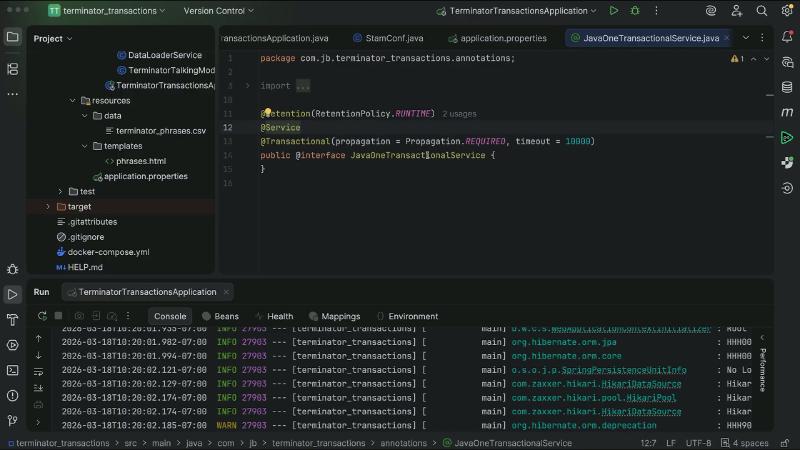
package com.jb.terminator_transactions.annotations with @Retention meta-annotation composing the transactional service.
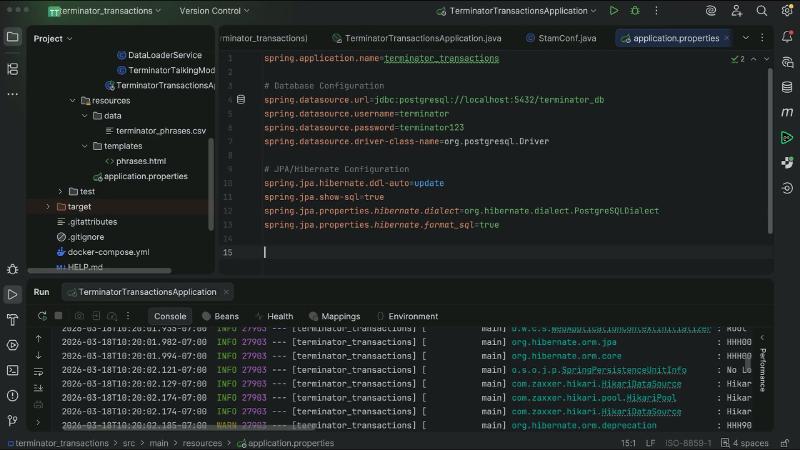
spring.datasource.url=jdbc:postgresql://localhost:5432/terminator_db and spring.application.name=terminator_transactions on screen.
For proxy boundaries see Understanding AOP Proxies.
To use a separate transaction on the inner path, inject your own proxy, obtain the current bean via ApplicationContext.getBean, or move logic to another Spring bean—not this.save() in the same class. The demo uses PostgreSQL and spring.jpa.hibernate.ddl-auto=update so persistence is visible; production should still validate rollback with transaction logs and integration tests, not only the puzzle slogan “Nothing will be saved.”
Common pitfalls#
- Believing method-level
REQUIRES_NEWalways “rescues” inner calls. - Not distinguishing injected proxy from
thisreference. - Treating composed meta-annotation
@JavaOneTransactionalServiceas syntax sugar that fixes self-invocation.
Reproducible troubleshooting checklist#
- Properties: breakpoint → Spring Properties → look up key → Navigate to override logic → check EPP in
META-INF/spring.factories. - Bean existence: Beans tab /
getBeanDefinition/ condition properties and XMLprimary. - Collection injection: evaluate
size()andgetClass()on theListfield; do not trust old-version puzzle memory. - Dynamic registration: verify JSON FQCN,
--debug, Registrarscope/order. - Transactions: step into the proxy on external calls; beware same-class internal calls.
- Versions: EPP registration keys, Boot 3.3+
Listbehavior, Framework 7BeanRegistrar—always follow your dependency version docs; do not cross-version puzzle answers.
Mastering the debugger does not replace reading the Reference, but it turns “magic” back into clickable source and definitions—which is what Spring Debugger is for: at a breakpoint, answer where a value came from, why a bean exists, and whether a call went through a proxy.
References and further reading#
- IntelliJ IDEA — Spring debugger (Evaluate / Spring Properties / Loaded beans)
- Spring Boot Reference — Externalized Configuration
- Spring Boot 4.0.6 — EnvironmentPostProcessor API
- Spring Framework — Classpath Scanning
- Spring Boot — @ConditionalOnProperty
- Spring Framework — Using @Autowired (collection injection)
- Spring Framework 7.0.7 — BeanRegistrar
- Spring Framework — Programmatic Bean Registration
- Spring Framework — Container Extension Points (BFPP vs BPP)
- Spring Framework — Bean Scopes (prototype destruction)
- Spring Framework — Declarative Transaction Management (self-invocation)
- Spring Framework — Understanding AOP Proxies
- Spring Framework — MutablePropertySources.addFirst
- Spring Framework — @Conditional
- Spring Boot — SpringApplication run and debug startup (IDE run configuration doc entry)